検証したその場で、切り抜きまで。 Review it. Cut it. Right there.
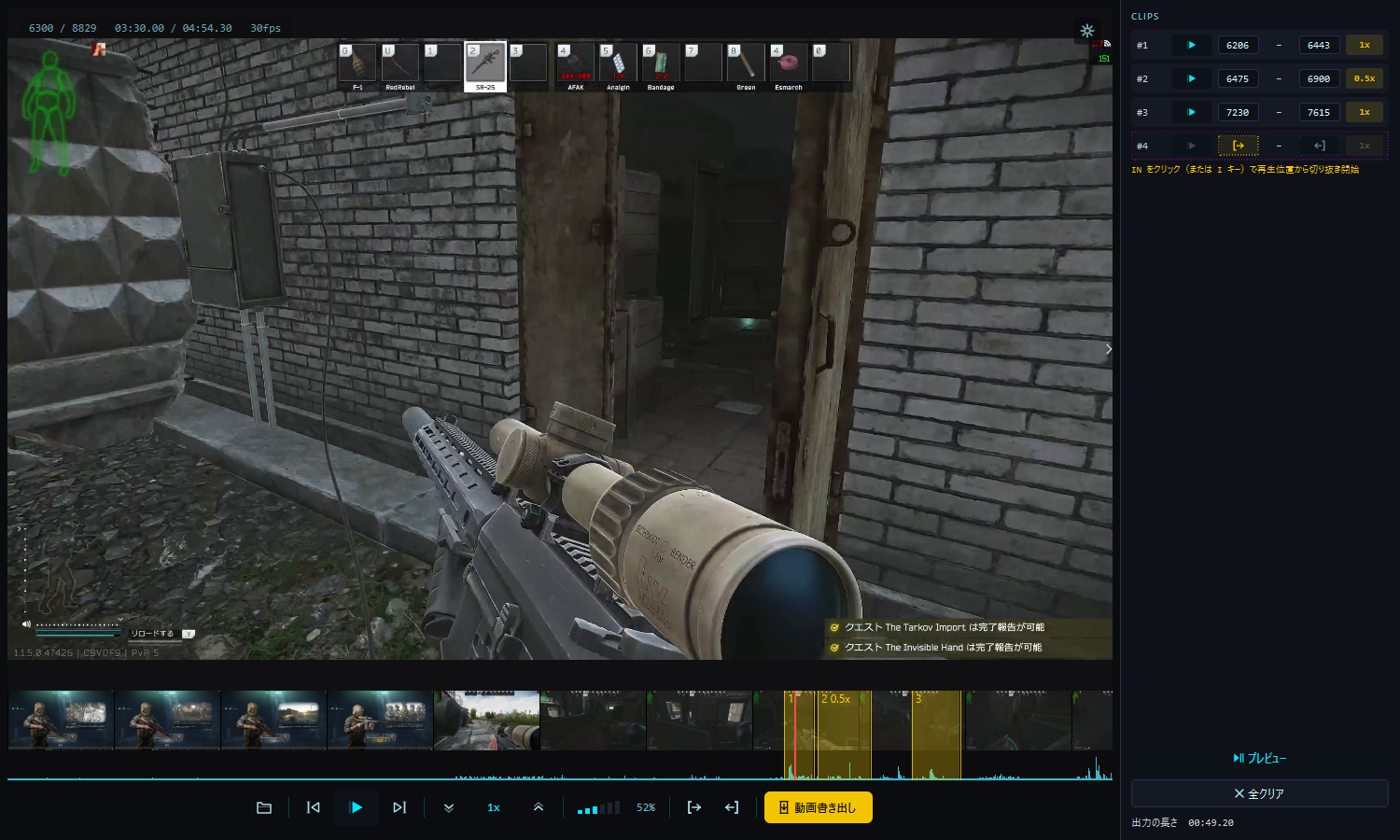
コマ送りと虫めがねで、撃ち合いの一瞬を確認。IN と OUT を打つだけで、クリップが右のパネルに並ぶ。スロー・倍速を混ぜて、縦でも横でも 1 本に書き出し。 Step frame by frame and magnify the moment of the fight.Mark IN and OUT, and the clip lands in the panel on the right.Mix slow-mo and fast-forward, then export one video — vertical or horizontal.
見つけて、切り抜いて、書き出す。
画面の右側ひとつで。
Find it, cut it, export it —
from one panel on the right.
録画を検証するプレイヤーから、検証したその場で縦動画・横動画を作れるツールへ。
More than a player for reviewing footage — a tool that turns what you just reviewed into a vertical or horizontal video, on the spot.
見つける
Find
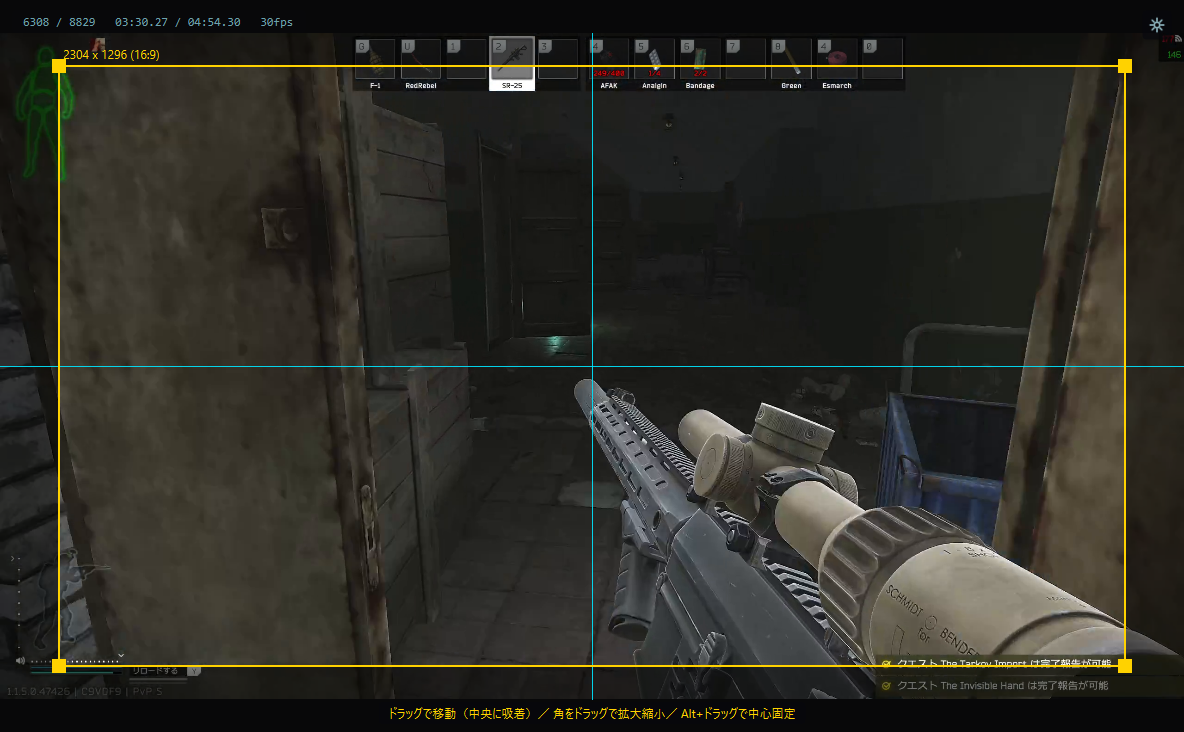
1コマずつ前後に行き来し、カーソル追従の虫めがねで拡大。音声波形で銃声の瞬間へ飛べる。
Step one frame at a time, both ways, and magnify under the cursor. Jump to the gunshot on the waveform.
02切り抜く
Cut
IN と OUT を打てば、クリップが右の CLIPS パネルに並ぶ。クリップごとにスロー・倍速も。
Hit IN and OUT, and the clip lands in the CLIPS panel. Give each one its own slow-mo or fast-forward.
03書き出す
Export
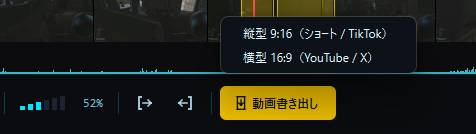
縦型 9:16 か横型 16:9 を選んで、1本の動画に。ショートにも YouTube にも。
Pick vertical 9:16 or horizontal 16:9 and export one video — for Shorts or for YouTube.
“どこから撃たれた?” を、1フレームで突き止める。
Pinpoint exactly where the shot came from — in a single frame.
死亡シーンで止めて、カーソルを合わせるだけ。相手の位置や着弾を、その場で拡大して確認できます。
Pause on the kill, move your cursor, and the spot zooms in instantly — enemy position, impact, everything.
1コマずつ、前にも後ろにも。
One frame at a time — forward and back.
長押しで連続送り。死亡の瞬間を行き来して、決定的な1フレームを探せます。
Hold to repeat. Scrub back and forth across the kill to find the decisive frame.
IN と OUT を打つだけ。
クリップは右のパネルに並ぶ。
Mark IN and OUT.
The clip lands in the panel.
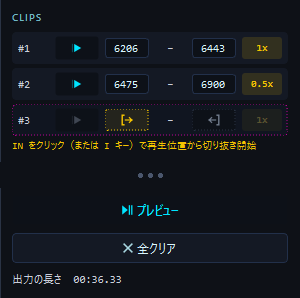
映像右端の ‹ › で開く CLIPS パネルが、切り抜きの作業台。確定したクリップを見ながら、再生・微調整・速度の指定までここで済みます。
The CLIPS panel — opened with ‹ › at the right edge of the video — is your cutting bench. Play, fine-tune and set the speed of every clip without leaving it.
-
IN と OUT を打つと、自動で確定IN + OUT, and it's a clip 確定ボタンを押す手順はありません。打った範囲がそのまま1行になります。No confirm button. The range you mark becomes a row on its own.
-
▶ でそのクリップだけを再生▶ plays just that clip 先頭から再生して、OUT で自動停止。切り抜いた範囲だけをすぐ確かめられます。From its first frame, stopping at OUT on its own — check the cut in a second.
-
フレーム番号をそのまま直せるEdit the frame numbers in place 直接入力、上下ドラッグ、ホイールで微調整。1コマ単位で詰められます。Type a number, drag up or down, or scroll — trim it to the exact frame.
-
次の行が、点線で待っているThe next row waits, dotted [→ をクリックすると再生位置に IN、←] で OUT。初めてでも「IN を打てば始まる」と分かります。Click [→ to set IN at the playhead and ←] for OUT. Even first-timers see where to start.
-
全クリアも取り消せるEven "Clear all" undoes うっかり全部消しても Ctrl+Z で元どおり。Wiped everything by mistake? Ctrl+Z brings it back.
キルの瞬間はスロー、移動は倍速。
1本の動画の中で。
Slow-mo on the kill, fast-forward on the move —
in one video.
速度バッジをクリックして選ぶだけ。0.1 倍から 16 倍まで、クリップごとに別の速度を指定できます。
Click a clip's speed badge and pick — anywhere from 0.1× to 16×, set separately for every clip.
音程はそのまま
Pitch stays put
音声は音程を保ったまま伸び縮み。スローでも声が低くなりません。
Audio stretches without changing pitch — voices don't drop in slow-mo.
書き出す前に分かる
See it before you export
プレビューも各クリップの速度で再生。仕上がりを確かめてから書き出せます。
Preview plays every clip at its own speed, so you know exactly what you'll get.
0.25 刻みで、どこからでも
0.25 steps, from anywhere
再生速度は 1 → 1.25 → 1.5 … と 0.25 刻み。速度表示のクリックやホイール、タイムライン上のホイールでも変えられます。
Playback speed moves in 0.25 steps. Click or scroll the speed readout — or just scroll over the timeline.
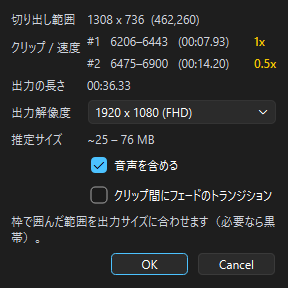
縦でも横でも、1本に。
Vertical or horizontal — one video.
書き出しボタンを押して、縦型 9:16 か横型 16:9 を選ぶだけ。解像度は縦横それぞれ前回の設定を覚えています。
Hit export and choose vertical 9:16 or horizontal 16:9. The resolution is remembered separately for each.
検証作業を、とにかく速く。
Built to make analysis fast.
音の瞬間へ即ジャンプ、次の録画へワンキー、コマ送り長押しで連続確認。検証のための道具がひと通り揃っています。
Jump to the loud moment, hop to the next recording with one key, hold to scrub frame by frame. Everything an analyst needs.
専用アイコンの、1段の操作列
A single row of purpose-built controls
ボタンはすべてこのアプリのために描いた専用アイコン。照準器を思わせる角ばった線とシアンの配色で、再生ボタンはシアンに光る角型。操作列は1段にまとめて中央寄せにし、ウィンドウを狭くしても崩れません。
Every button is an icon drawn for this app — hard-edged, sight-like lines in cyan, with a play button that glows. The controls sit in one centered row and hold their shape even in a narrow window.


上が停止中、下が再生中。Stopped above, playing below.
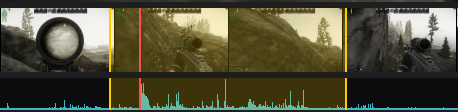
サムネイル帯
Filmstrip
動画全体をサムネイルで俯瞰し、見たい場面へ素早くシーク。
Overview the whole video as thumbnails and seek to any scene fast.
音声波形タイムライン
Audio waveform timeline
銃声など大きい音がスパイクで一目で分かり、その瞬間にすぐ飛べる。赤いプレイヘッドも一目瞭然。
Loud sounds like gunfire show up as spikes — click to jump straight there. The red playhead is always visible.
レベルメーター型の音量
Level-meter volume
音量はレベルメーターの形で表示。今どれくらい鳴っているかが一目で分かります。
Volume shows as a level meter, so you can see how loud it is at a glance.
前後ファイルへワンキー移動
Jump between files
同フォルダ内の録画を Ctrl+→ / Ctrl+← で次々検証。最近のファイル履歴も右クリックですぐ。
Move through recordings in a folder with Ctrl+→ / Ctrl+←. Recent files are one right-click away.
キー & マウス割り当て
Custom key & mouse map
操作を自由に再割り当て。自分の手に馴染ませられる。
Remap every action freely to fit your hands.
日本語 / 英語対応
Japanese / English
起動時にOS言語を自動判定、設定で切替も可能。
Auto-detects your OS language at launch; switchable in settings.
幅広いフォーマット対応
Broad format support
MP4 / MKV / MOV / AVI / WebM ほか。FFmpeg内蔵で別途インストール不要。
MP4 / MKV / MOV / AVI / WebM and more. FFmpeg is built in — no extra install.
実際の画面
Inside the app
軽く動いて、しっかり作り込まれている。
Lightweight to run, seriously engineered inside.
正確なコマ戻し
Accurate reverse-stepping
キーフレームへシーク → 順方向デコード + フレームキャッシュで、フレーム間圧縮の動画でも1コマ単位で後退できます。
Seeks to a keyframe, decodes forward and caches frames — so even inter-frame-compressed video steps backward exactly one frame.
カクつかない再生
Smooth playback
バックグラウンドの先読みデコードスレッドが音声クロックに同期。デコード負荷で映像がカクつきません。
A background prefetch-decode thread stays in sync with the audio clock, so decode load never stutters the video.
通信は起動時の更新確認だけ
The only network call is the update check
起動時に GitHub の Releases を1回だけ確認し、新しい版があればタイトルバーに 🔔 ボタンを出します。送るのは公開APIへのGETのみで、個人情報も視聴履歴も送りません。 設定の「起動時にアップデートを確認する」を切れば通信はゼロになります。
It checks GitHub Releases once at startup and shows a 🔔 button in the title bar when a newer build exists. That is a plain GET to a public API — no personal data, no viewing history — and turning off "check for updates at startup" in settings makes it zero.
初回起動の注意
First launch note
未署名のため、初回起動時に Windows SmartScreen の警告が出る場合があります。「詳細情報」→「実行」で起動できます。
The app is unsigned, so Windows SmartScreen may warn on first launch. Click “More info” → “Run anyway”.
今すぐ、無料で。
Get it now, free.
ZIPを解凍して exe をダブルクリックするだけ。インストールも、Python等の事前準備も要りません。
Just unzip and double-click the exe. No install, no Python setup, nothing to configure.
¥0 · オープンソース$0 · Open sourceファイル:File: FPSRePlayer-vX.Y.Z-win64.zip(フォルダごと解凍し、FPSRePlayer.exe は _internal と同じ場所に置いたまま使います) (unzip the whole folder and keep FPSRePlayer.exe next to _internal) · Windows 10 / 11 (64bit)