タスク名を言うだけで、Wikiが開く。 Say the quest name. The wiki opens.
マイクボタンを押している間にタスク名・マップ名・脱出地点名・鍵の名前を言うと、Escape from Tarkov の Wiki の該当ページがブラウザで開く。日本語でも英語でも、日本語Wikiでも英語Wikiでも。読めない名前は、タスク一覧を撮って貼ればまとめて開けます。 Hold the mic button, say a quest, map, extract or key name, let go — the matching Escape from Tarkov wiki page opens in your browser. Japanese or English, either wiki. Can't say it? Paste a screenshot of your quest list and open everything in it at once.
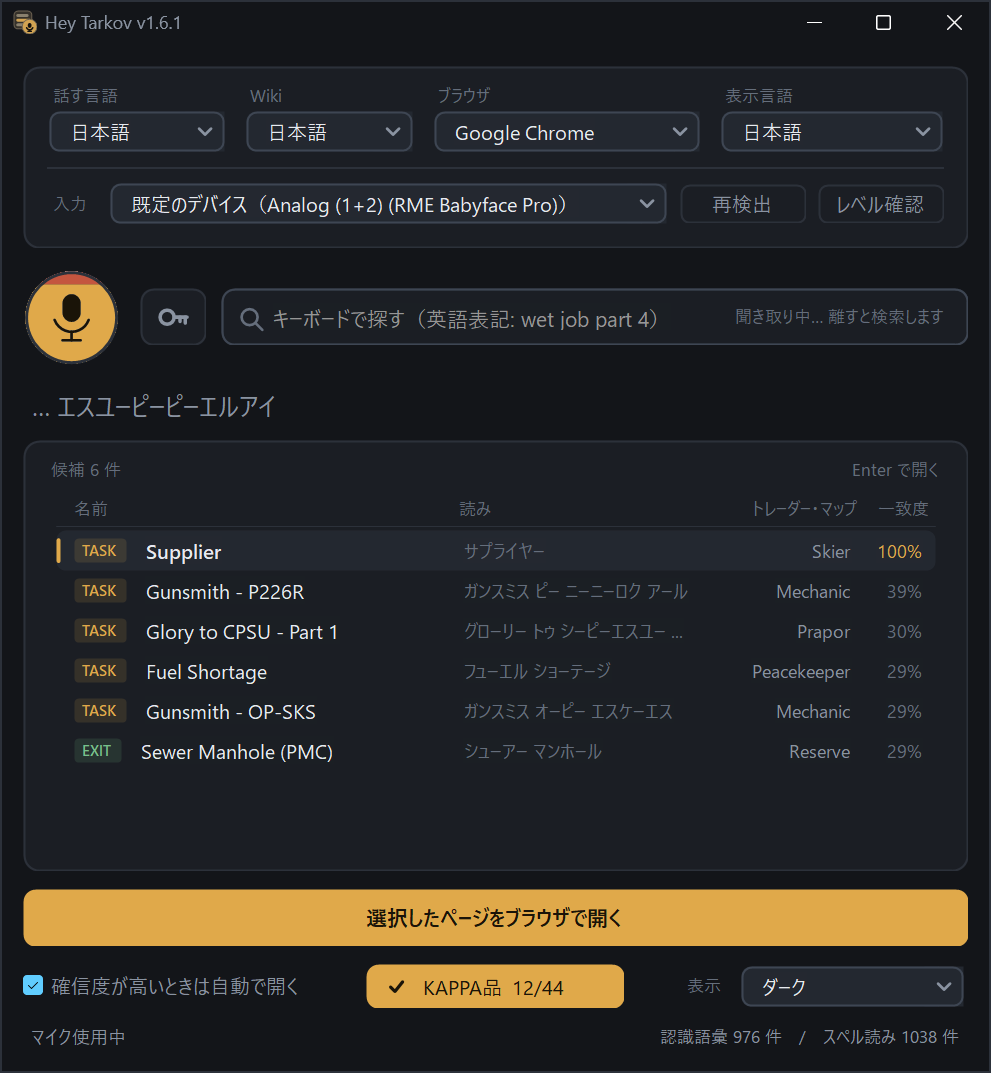
押して、言って、離す。
Hold, speak, release.
Alt+Tab で切り替えて使う想定。押している間だけマイクを掴み、離した瞬間に候補が出ます。確信度が高ければ、そのままブラウザでWikiが開きます。
Built to Alt+Tab into mid-raid. The mic is grabbed only while the button is held; release and the candidates appear. If the match is confident, the wiki page just opens.
言語とWikiを選ぶ
Pick language & wiki
上部で、開くWiki(日本語 / 英語)とブラウザ、画面の表示言語を選びます。話す言語(日本語 / ENG)と入力デバイスは「マイクの設定を表示」を開いた行に。選択はすべて記憶されます。
Up top you pick which wiki to open, your browser and the interface language. The spoken language (Japanese / ENG) and the input device live behind "Show mic settings". Every choice is remembered.
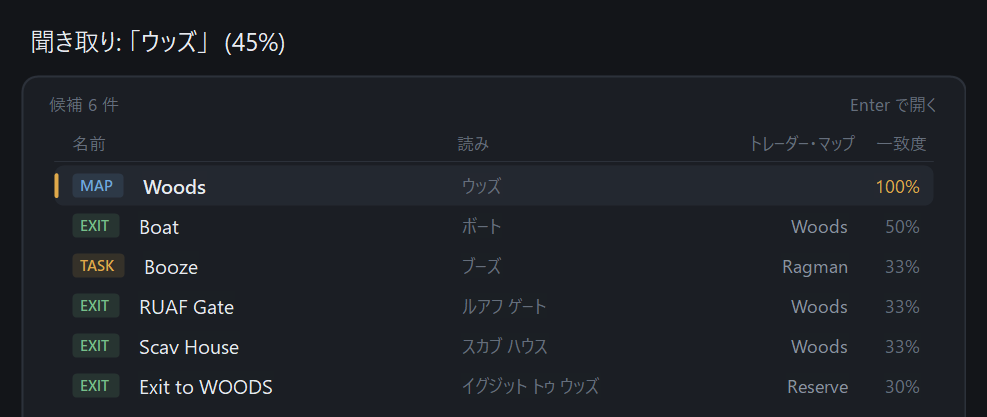
押しっぱなしで言う
Hold and say it
「ウェット ジョブ パート フォー」でも「wet job part four」でも通ります。途中まででも構いません。数字は英語読み・日本語読みのどちらでも。
Say it as you would read it — "wet job part four" or "wet job part 4". A partial name is enough, and numbers work either way.
Wikiが開く
The wiki opens
選んだブラウザで該当ページを直接開きます。リンクはWikiから取得した実URLなので、404を踏みません。
The page opens directly in your chosen browser, using the real URL taken from the wiki — so you never land on a 404.
読めない名前は、貼ればいい。
Can't say it? Paste it.
ゲームのタスク一覧を Win+Shift+S で撮って、Hey Tarkov で Ctrl+V。写っているタスク名を読み取って候補に並べ、まとめてブラウザで開けます。
Grab your quest list with Win+Shift+S, then press Ctrl+V in Hey Tarkov. It reads the quest names in the picture, lines them up, and opens them all in your browser.
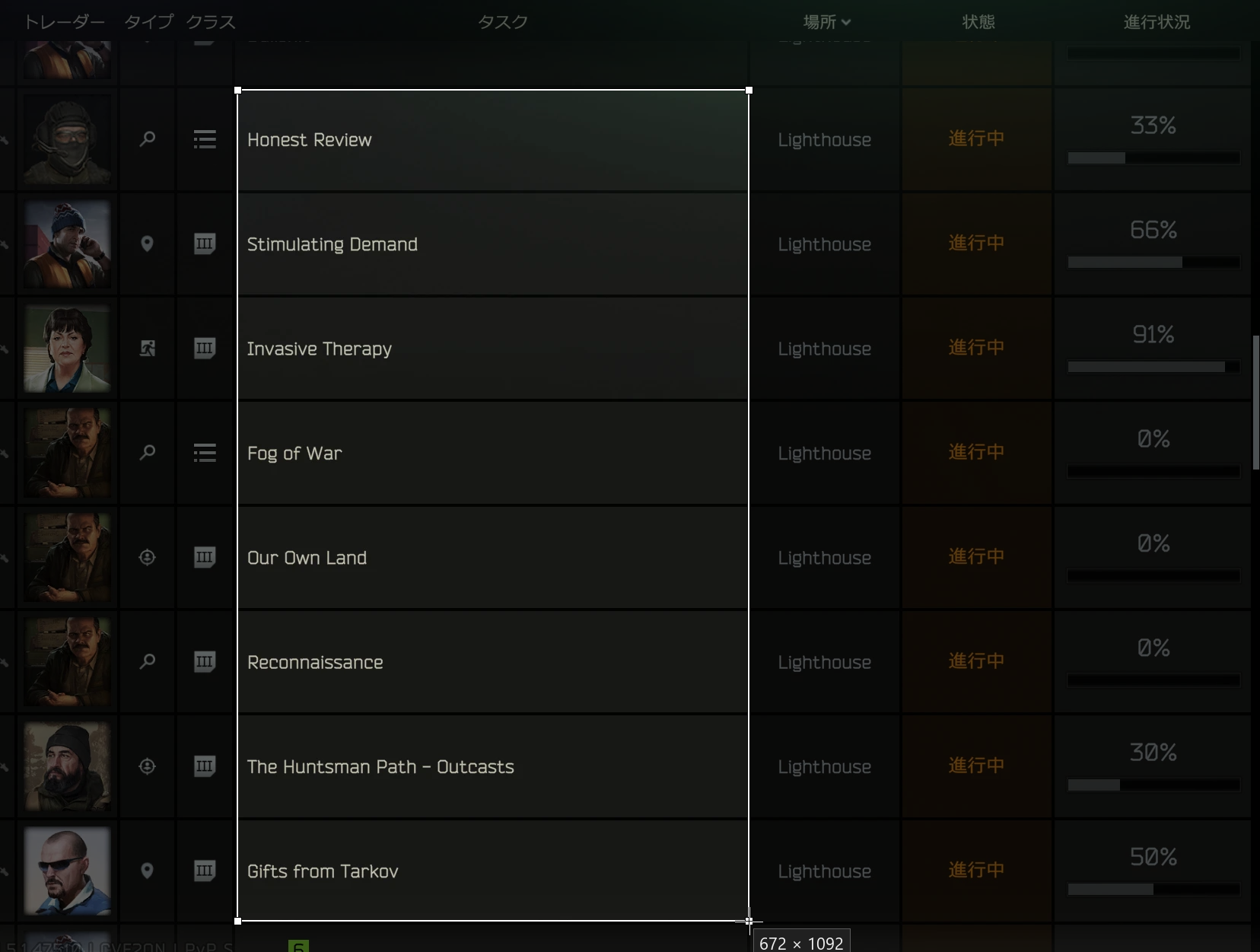
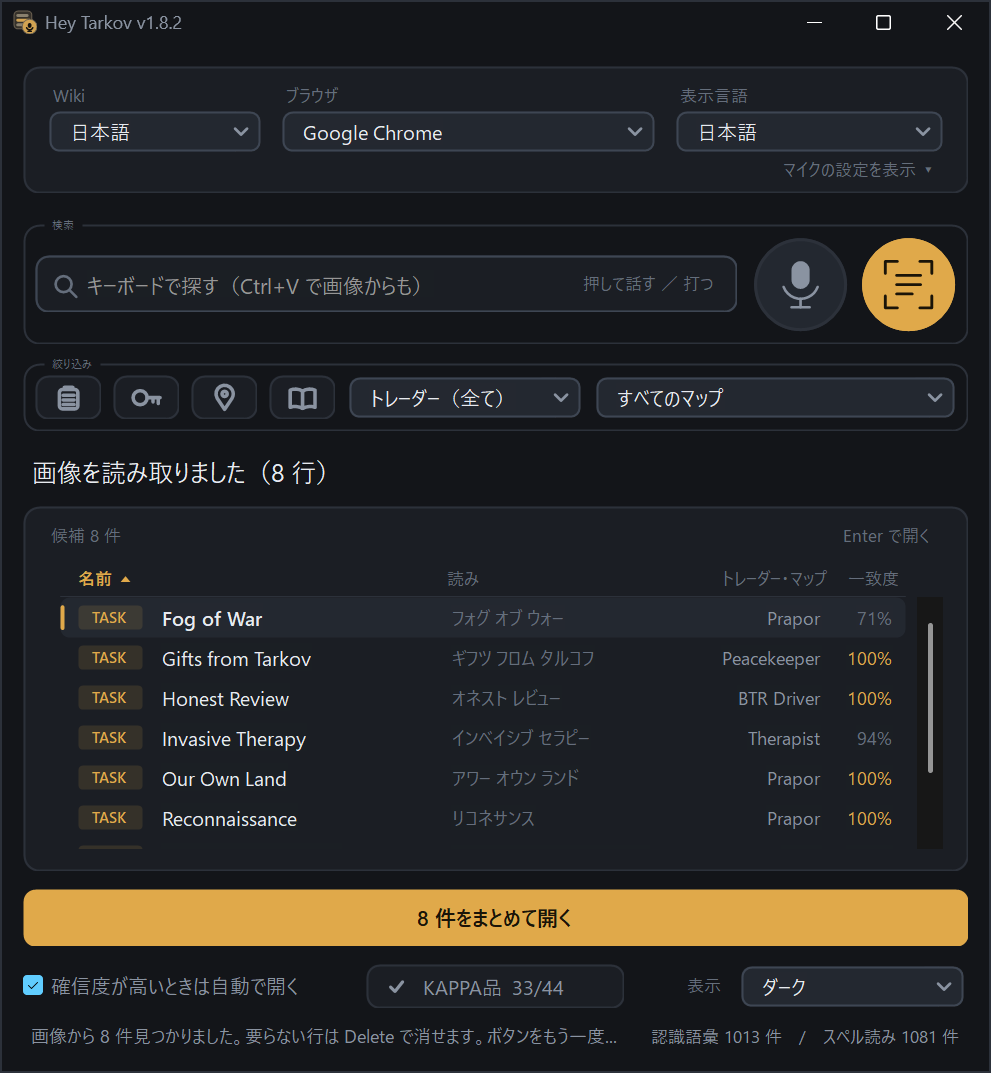
Honest Reviewlnvasive TherapyFog 0f War読み間違いは起きます。小文字の l と大文字の I、o と 0 のような取り違えです。だから一致度を並べて、開く前に確かめられるようにしています。要らない行は Delete で外せて、まとめて開く前にも確認が出ます。 It does misread sometimes — l for I, 0 for o. That's why every row carries its match score, so you can check before anything opens. Drop a row with Delete; opening them all asks first.
話さなくても、並んでいる中から選べる。
Don't feel like talking? Just browse.
起動すると、収録している1,390件が名前順にすべて並びます。種類のボタンと、トレーダー・マップの選択で、見たい範囲まで絞り込めます。
On launch all 1,390 entries are listed alphabetically. Narrow them down with the type buttons and the trader and map pickers.
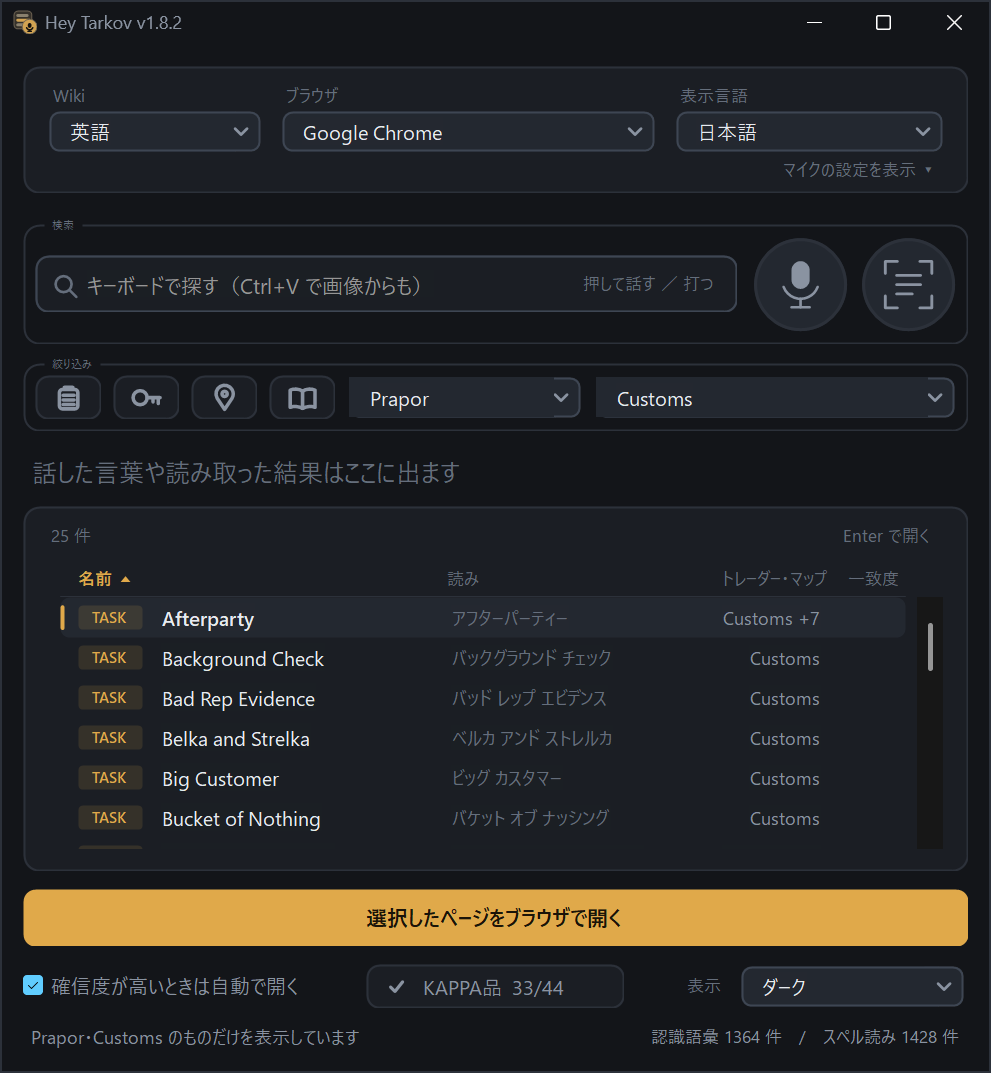
- 起動したら、もう並んでいるIt's already listed when you open it探しはじめる前から全件が名前順に。何が入っているかを眺めるだけでも使えます。Everything is there in alphabetical order before you search for anything — handy just to see what it knows.
- 種類で絞る4つのボタンFour buttons for the typeタスク・鍵・マップ・ストーリー。どれも押していなければ、全部の中から探します。Quests, keys, maps, story. With none of them pressed, everything is in scope.
- トレーダー + マップで同時にTrader and map together「Prapor の Customs のタスク」まで一息で絞れます。声や打ち込みの結果も、この範囲の中から出ます。"Prapor's quests on Customs" in two clicks. Speaking and typing search inside that scope too.
- どのマップのタスクか、その場で見えるThe map is right there in the rowトレーダーを選んでいる間は、右の列がマップ名になります(複数のマップにまたがるタスクは
Customs +7のように)。While a trader is selected the right-hand column shows the map —Customs +7when a quest spans several.
タスクだけじゃない。マップと脱出地点も。
Not just quests — maps and extracts too.
タスク943件に加えて、マップ15種と脱出地点143件を収録。 「どこから出られるんだっけ」を、ゲームを閉じずに引けます。
On top of 943 quests it carries 15 maps and 143 extracts. Look up "where do I extract again?" without leaving the raid.
日本語Wikiのほうが細かく飛べます。脱出地点ごとに見出しがあるため出口そのものへ着地します。 英語Wikiは全出口が1つの表にまとまっているため、その表まで。向こうのページ構造の違いによるものです。 The Japanese wiki lands more precisely. It has a heading per extract, so you land on the extract itself; the English wiki keeps every extract in one table, so you land on that table. That's a difference in how the two wikis are structured.
鍵の名前も、言えば出る。
Keys too — just say the name.
絞り込みの鍵ボタンを押すと、聞き取りと候補が鍵245件だけに切り替わります。もう一度押せば、タスクやマップの検索に戻ります。
Press the key button in the filter row and listening and results switch to the 245 keys only. Press it again to go back to quests and maps.
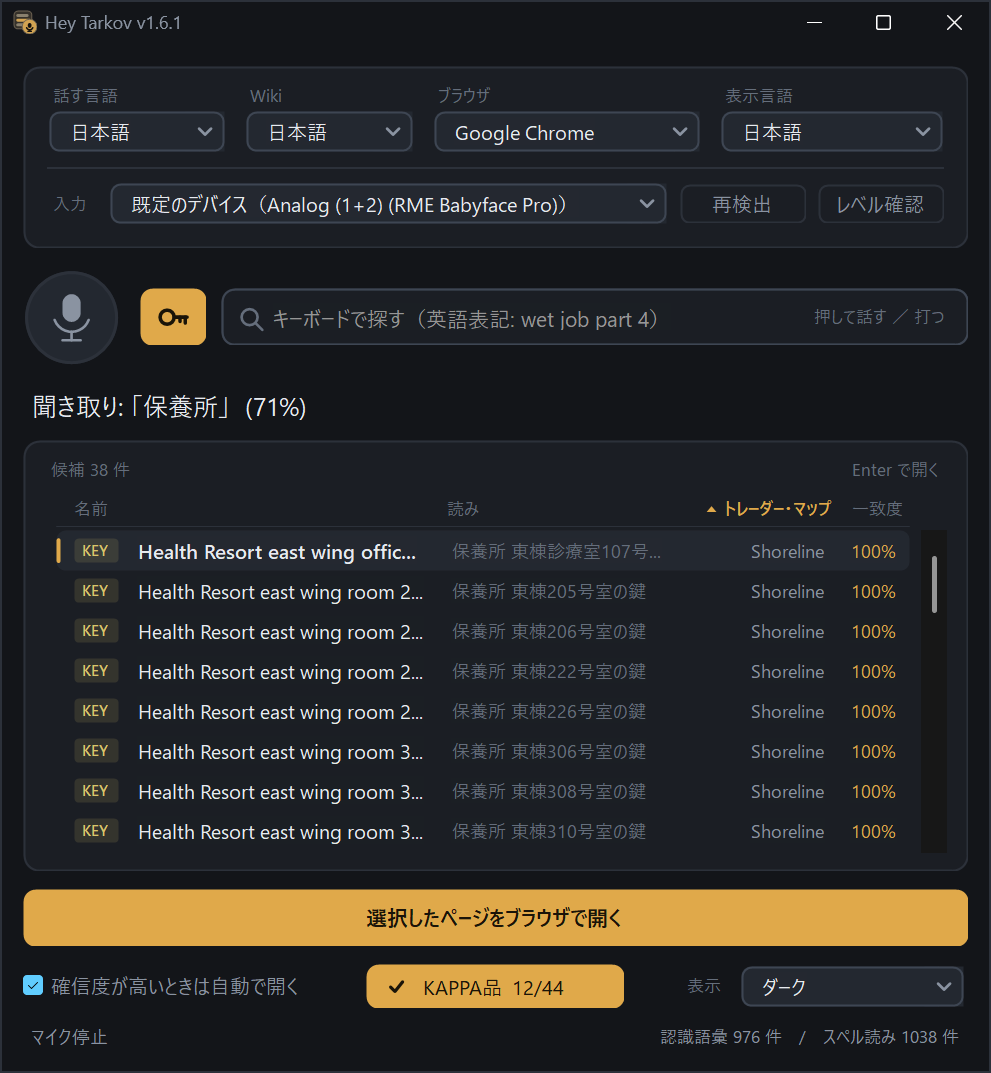
- 日本語名でも英語名でもJapanese or English names日本語名はゲーム画面の日本語名(Wiki の見出しではありません)。「マークの刻まれた廃工場の鍵」でも「TerraGroup Labs キーカード(レッド)」でも通ります。日本語名があるのは245件中212件で、残りは英語名のカタカナ読みで。Say the English name as it appears in game. In Japanese mode the in-game Japanese name works too.
- 途中まででも候補が並ぶA partial name is enough「保養所」まで言えば保養所の鍵38件。英語名の途中から「ドーム ルーム 314」のようにも言えます。Say "health resort" and every Health Resort key lines up. "Dorm room 314" works from the middle of a name too.
- マップ名が分かる鍵はマップ名も表示Map shown where it's known245件中235件は、候補の右の列にどのマップの鍵かが出ます。列の見出しで並べ替えもできます。For 235 of the 245 keys the map appears right in the list — and you can sort by it.
- カードキー28件を追加28 keycards addedTerraGroup Labs の6色のキーカードなど、v1.8 で増えた分も同じように探せます。The six TerraGroup Labs lab cards and the rest of the new keycards work the same way.
- KEY バッジで一目で分かるMarked with a KEY badge鍵の行には専用の色のバッジが付きます。開くのはいつもどおり、その鍵の Wiki のページです。Key rows carry their own colored badge. Opening one takes you straight to that key's wiki page.
コレクターの44品目、何を持っているかを記録。
Track which of the 44 Collector items you have.
カッパ(Kappa)のためのコレクター44品目の一覧です。画面下の「KAPPA品 33/44」ボタンを押すと、一覧がそのままチェックリストに切り替わります(もう一度押すと元に戻ります)。
The 44 Collector items you need for the Kappa container. The "Kappa items 33/44" button at the bottom turns the list into a checklist — press it again to go back.
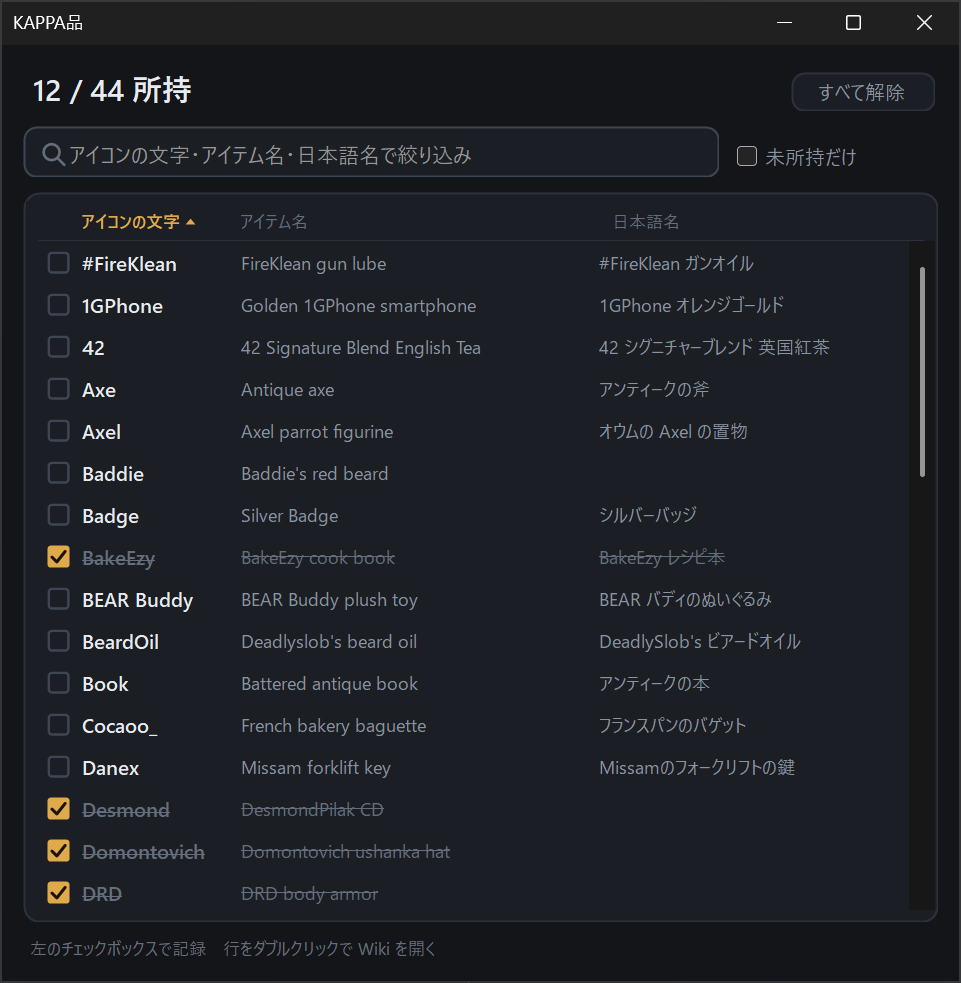
- ボタンに所持数がそのまま出るThe count lives on the button画面下の
KAPPA品 33/44ボタンを見れば、残りがいくつかすぐ分かります。押せばその場でチェックリストに切り替わります。TheKappa items 33/44button at the bottom keeps the count in view — press it and the list becomes the checklist. - 閉じても、更新しても残るSurvives restarts and updatesチェックは入れた瞬間に保存。記録はPCの中のファイルに書くだけで、通信はしません。exe を新しい版に置き換えても消えません。Each tick is saved instantly to a file on your PC — no network involved. Replacing the exe with a new version keeps it.
- 絞り込みと「未所持だけ」Filter, or show only what's missing検索ボックスがそのまま絞り込みになり、「未所持だけ」で残りだけを表示(次に開いたときも覚えています)。列の見出しで並べ替えもできます。The search box becomes the filter, and "Missing only" — which it remembers — leaves just what you still need. Click a column header to sort.
- ダブルクリックで WikiDouble-click for the wiki行をダブルクリックすると、その品目の Wiki のページが開きます。押し間違えてチェックした行は、チェックリストを出るまで取り消し線のまま残るので戻せます。Double-click a row to open that item's wiki page. Ticked something by mistake? The row stays struck through until you leave the checklist, so you can undo it.
発音がわからないなら、アルファベットで言えばいい。
Can't pronounce it? Just spell it out.
英語のタスク名は、日本語話者には読み方が分かりにくいものが多い。Hey Tarkov は1文字ずつのアルファベット読みも受け付けます。実測では単語読みより確信度が安定します。
English quest names are hard to pronounce if Japanese is your first language. Hey Tarkov also accepts letter-by-letter spelling — in practice it scores more reliably than saying the words.
Shortage … 単語読み 0.31 → スペル読み 0.87Shortage … as words 0.31 → spelled 0.87Fall Ailment → エフ エー エル エル エー アイ エル エム イー エヌ ティー日本語Wikiと英語Wiki、どちらでも。
Japanese wiki or English wiki — your call.
読みたいWikiをドロップダウンで切り替えるだけ。切り替えると音声認識の文法と検索インデックスの両方が組み直されます。
Switch with one dropdown. Changing it rebuilds both the speech grammar and the search index.
切り替えると、言い直さずに探し直します。「コード ブリーチ」と言ったあとに英語Wikiへ切り替えれば、
同じ言葉のまま向こうで検索し直します(日本語Wiki 15件 → 英語Wiki 22件)。勝手にページを開くことはしません。
声で聞き取るのは選択中のWikiにある名前です。打ち込んだ名前がそのWikiに無く、もう一方のWikiにあれば、赤い行で知らせてそちらのページを開けます。Wikiを切り替えたときも同じで、切り替える前のWikiにしか無かった項目は赤い行で残ります。
Switching re-runs your last search. Say "Kord Breach" on the Japanese wiki, flip to the English one,
and it searches again with the same words — 15 hits become 22. It never opens a page on its own.
Voice recognition listens for names the selected wiki has. If a name you type exists only on the other wiki, it shows up as a red row and opens that wiki's page instead. The same goes after switching wikis.
レイド中に、手を止めない。
Made to not slow you down.
聞き取ってもらえないとき、マイクが拾っていないとき、そもそも読み方が分からないとき。詰まりそうな場所には全部逃げ道を用意しています。
When it mishears you, when the mic isn't picking up, when you have no idea how to pronounce it — every dead end has a way out.
収録した名前だけを聞き取る
Recognition locked to the catalog
Windows標準の音声認識を、語彙を収録済みの1,390件の名前だけに絞ったクローズドグラマーで動かしています。辞書が小さいぶん当たりやすく、音声がクラウドに送られることもありません。
Runs the built-in Windows recognizer against a closed grammar containing only the 1,390 names it ships with. A tiny dictionary means better hits — and nothing is ever sent to a cloud service.
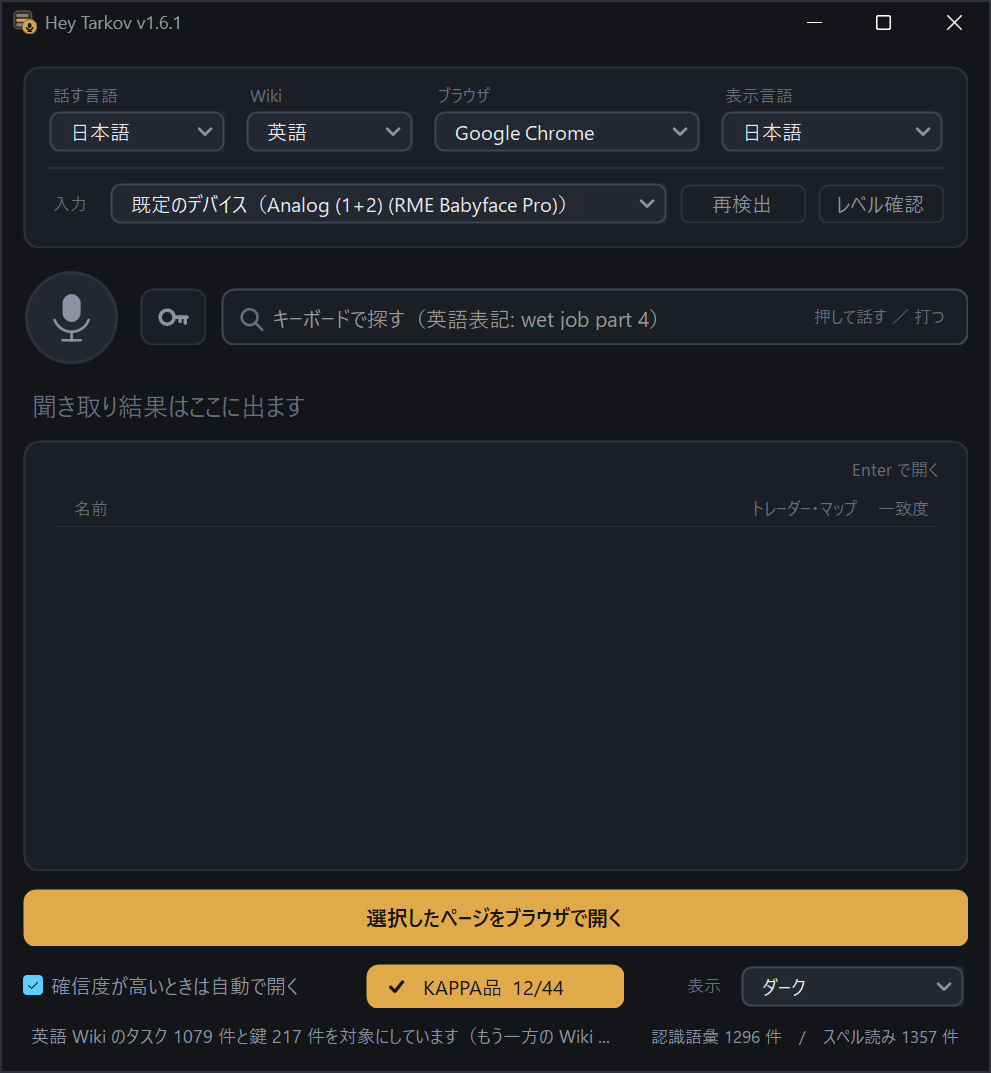
カタカナ読みを併記
Katakana readings
候補リストの各タスクに読みが出るので、「次はこう言えばいい」がその場で分かります。
Every candidate shows how to say it, so you learn the phrasing right where you needed it.
イベントのタスクをまとめて
Pull up a whole event
シーズンイベントのタスクには EVENT バッジが付き、イベント名を言えばそのイベントのタスクだけが並びます(「コード ブリーチ」→ KORD BREACH の22件)。ストーリーのタスク10件には STORY バッジが付きます。所属は英語Wikiの本文から読み取っているので、次のシーズンも一覧の再生成だけで付きます。
Seasonal quests carry an EVENT badge, and saying the event name lists just that event — "Kord Breach" brings up all 22. The 10 story quests carry a STORY badge of their own. Membership is read from the English wiki itself, so the next season needs only a catalog rebuild.
全部言わなくていい
A partial name is enough
「ブロードキャスト」まで言えば Broadcast - Part 1〜5 が並びます。断片のときは自動では開かず、候補を出すだけ。キーボード検索も同じ仕組みで、打ちかけでも候補が出ます。
Say just "Broadcast" and Broadcast - Part 1–5 line up. A fragment never auto-opens — it only lists. Typing works the same way, mid-word.
キーボードでも探せる。ひらがなでも
Keyboard search, with sorting
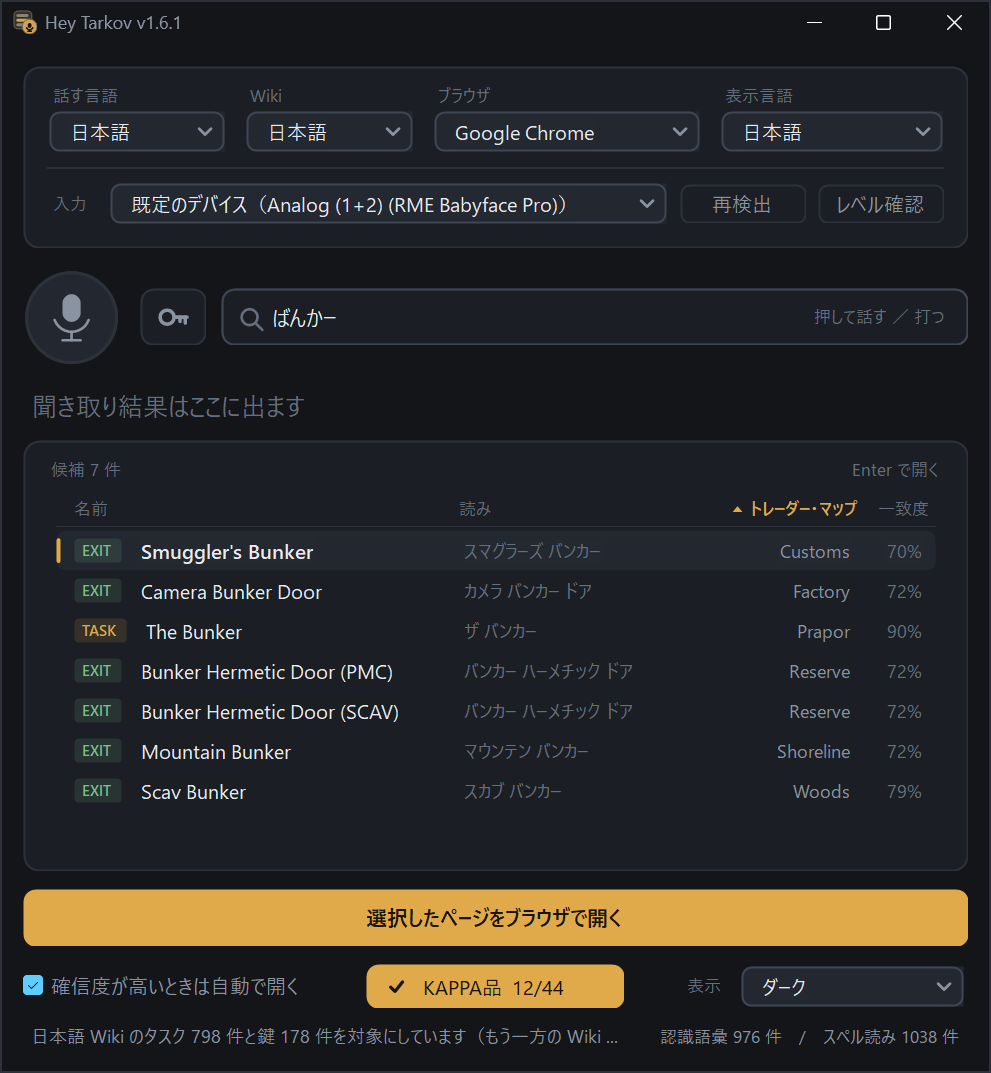
声を出せない場面では打ち込んで。英語名でも、ひらがな・カタカナでも探せます(「ばんかー」→ Bunker を含む7件)。鍵やKAPPA品はゲーム画面の日本語名(漢字)でも。名前と読みのどちらも、途中の文字で引っかかります(USEC で Rogue USEC の鍵も)。候補は名前・読み・トレーダー/マップ・一致度の見出しで並べ替えられます。
Can't talk? Type it — partial names work, just like speaking ("bunker" lists 8 hits), and it matches mid-word, in the name or the reading (USEC finds the Rogue USEC key too). Results can be sorted by name, reading, trader / map or match with one click on the header.
マイクボタンが音量計
The mic button is the level meter
押している間、丸が下から満ちる(音割れに近づくと上が赤)。「マイクの設定を表示」の中の「レベル確認」では最大値が線で残り、その線の色が判定です(動かない=小さすぎ/緑=適正/上端が赤=歪む)。数値も dBFS で出ます。
Hold it and the dial fills from the bottom, turning red at the top as you approach clipping. The level check — under "Show mic settings" — leaves your peak as a line, and its colour is the verdict — stuck low means too quiet, green is right, red at the top means clipping. The dBFS number is there too.
入力デバイスを選べる
Pick your input device
オーディオインターフェースでは既定デバイスが目的のマイクとは限りません。「マイクの設定を表示」を開けば一覧から選べて、繋ぎ替えたら「再検出」。
With an audio interface the Windows default is rarely the mic you mean. Open "Show mic settings", pick it from the list, and re-scan after hot-swapping.
ブラウザを選べる
Pick your browser
既定 / Chrome / Edge / Firefox / Brave など、Windowsに登録されているものから選択。名前で照合するので順番がずれても追従します。
Default, Chrome, Edge, Firefox, Brave — whatever Windows knows about. Matched by name, so reordering never breaks it.
画面も英語にできる
The app speaks English too
v1.3.0 で画面表示そのものが英語に対応しました。初回起動時は Windows の表示言語に追従し、表示言語を変えると話す言語とWikiも一緒に切り替わります。選択肢は言語自身の表記(日本語 / English)なので、読めない言語で開いても戻れます。
Since v1.3.0 the interface itself is in English. It follows your Windows display language on first launch, and switching it moves the spoken language and the wiki with it. The picker lists each language in its own script, so you can always find your way back.
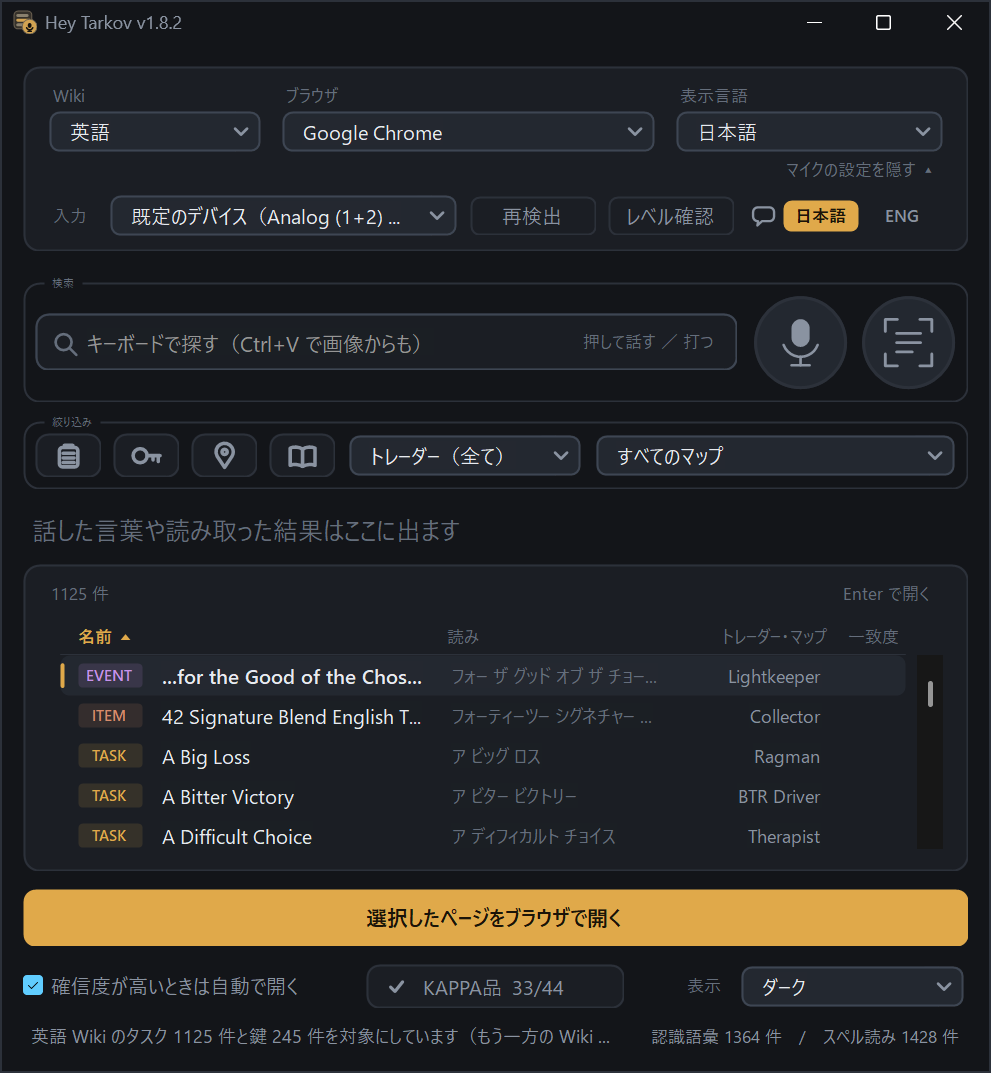
ライト / ダークテーマ
Light / dark theme
システム追従・ライト・ダークから選択。ステータス行やレベル判定の色も、明暗どちらでも読める値に揃えています。
Follow system, or force light or dark. Status and level colors stay readable in both.
一覧はアプリに同梱
The list ships inside the app
1,390件の項目はビルド時に埋め込まれた固定データ。実行中にWikiへ問い合わせることはありません。通信するのは起動時のバージョン確認1点だけで、一覧が増えるのは新しい版が出たときです。
All 1,390 entries are baked in at build time. The app never queries a wiki while running — its only network call is the version check at startup, and the list grows when a new build ships.
このアプリは、ゲームに一切触れない。
This app never touches the game.
設計上、以下を行いません
By design, it does none of this
やっているのは「マイクから録音」「文字列一致」「ブラウザを起動」の3つだけ。ブラウザのショートカットをダブルクリックするのと同じ挙動しかしません。
It records from a mic, matches a string, and launches a browser. Functionally the same as double-clicking a browser shortcut.
- ゲームプロセスのメモリ読み書きNo reading or writing game memory
- DLL インジェクションNo DLL injection
- DirectX フック / ゲーム内オーバーレイNo DirectX hooks or in-game overlay
- ゲームウィンドウへの合成入力送信No synthetic input to the game window
- カーネルドライバNo kernel driver
- グローバルホットキーNo global hotkeys
- EXE のパッキング・難読化No packing or obfuscation of the exe
- 音声のクラウド送信No audio leaves your PC
- 実行中の Wiki へのアクセス(一覧はアプリ同梱。KAPPA品の記録もPC内だけ)No wiki requests while running (the list is bundled; Kappa progress stays on your PC)
常駐させても気づかない軽さ。
Light enough to just leave running.
合成音声によるエンドツーエンド検証
End-to-end tested with synthetic speech
--selftest で英語・日本語の聞き取りを通しで確認しています。1文字ごとに600msの間を空けたスペル読みや、脱出地点のリンクにアンカーが付いているかの実URL照合も含みます。合成音声は肉声より認識しやすいため、これは配線の正しさを示すもので、実際の精度を保証するものではありません。
--selftest runs English and Japanese recognition end to end — including spelling with a 600ms pause between letters, and a real-URL check that extract links carry the right anchor. Synthetic speech is easier to recognize than a real voice, so this proves the plumbing, not real-world accuracy.
語で区切ることの効果
Why letters are separate words
スペル読みを1語にまとめると、途中で息継ぎした時点で一致しなくなり、文法コンパイルも7.5秒かかっていました。1文字ずつ独立させて73msまで縮み、間を空けても認識します。
Spelling as one long word broke on any breath and took 7.5s to compile. Splitting it per letter cut that to 73ms and made pauses harmless.
ZIP が大きくなった理由
Why the download grew
v1.8 で、画像の文字認識に使う Windows の部品(約25MB)を同梱しました。読み込むのは画像を読むときだけなので、待機中の軽さは変わりません(アイドル時 CPU 0%、メモリも据え置き)。
v1.8 bundles the Windows components used for reading text from images (~25MB). They're only loaded when you actually read an image, so idling is as light as before — still 0% CPU and the same memory.
英語モードには追加インストールが必要な場合があります
English mode may need an extra install
英語(米国)の音声認識がWindowsに入っていない場合は追加が必要です(設定 → 時刻と言語 → 言語と地域)。同梱の tools\install-en-speech.ps1 でも入れられます。日本語認識は標準で入っていることが多いです。
If English (United States) speech recognition isn't installed, add it under Settings → Time & language. The bundled tools\install-en-speech.ps1 can do it too. Japanese recognition is usually present already.
初回起動の注意
First launch note
未署名のため、初回起動時に Windows SmartScreen の警告が出る場合があります。「詳細情報」→「実行」で起動できます。
The app is unsigned, so Windows SmartScreen may warn on first launch. Click "More info" → "Run anyway".
今すぐ、無料で。
Get it now, free.
ZIPを展開して exe をダブルクリックするだけ。インストーラも設定ファイルの編集も要りません。自己完結版を選べばランタイムの導入も不要です。
Unzip, double-click the exe. No installer, no config files. Pick the self-contained build and you need no runtime at all.
¥0 · オープンソース(MIT)$0 · Open source (MIT)Windows 10 / 11 · 自己完結版 50.4MB(ランタイム不要)/ 別途ランタイムなら 7.0MB · 日本語/英語の音声認識Windows 10 / 11 · 50.4MB self-contained (no runtime needed) or 7.0MB with the .NET 10 runtime · Japanese / English speech recognition
よくある質問
Frequently asked
インストールは必要ですか?Do I need to install it?
アンチチートに引っかかりませんか?Will this get me flagged by anti-cheat?
マップや脱出地点も引けますか?Can it look up maps and extracts?
Boat (PMC))。Yes. It carries 15 maps and 143 extracts alongside the 943 quests (plus 245 keys and 44 Kappa items). Say "Ground Zero" for the map page or "Emercom Checkpoint" for that extract — the map name is optional. PMC- and SCAV-only extracts carry their faction in the name, e.g. Boat (PMC).タスク名を最後まで言わないとダメですか?Do I have to say the whole name?
Broadcast - Part 1〜5)。ただし断片は1件に絞れないので自動では開かず、候補を出すだけです。フルネームを言ったときだけ従来どおり自動で開きます。No. A partial name lists the matching group ("Broadcast" → Broadcast - Part 1–5). A fragment can't be narrowed to one page, so it only lists — it never auto-opens. Only a full name opens straight away.タスク名の発音がわかりません。I don't know how to pronounce the quest name.
Fall Ailment なら「エフ エー エル エル エー アイ エル エム イー エヌ ティー」。候補リストにはカタカナ読みも出るので、次からはそれを見て言えます。Spell it out letter by letter — that path is fully supported and often scores better than saying the words. Every candidate also shows its katakana reading for next time.マイクが反応しません。The mic isn't responding.
英語モードが動きません。English mode doesn't work.
日本語Wikiと英語Wikiで候補が違うのはなぜ?Why do the two wikis show different candidates?
ゲームの画面を勝手に撮られませんか?Does it take pictures of my screen?
画像の読み取りを間違えたらどうなりますか?What if it misreads the image?
lnvasive Therapy → Invasive Therapy 94% のように)。要らない行は Delete キーで外せますし、まとめて開く前に「ブラウザのタブを N 枚開きます」と確認が出ます。Every row shows how well it matched, so you see it before anything opens (lnvasive Therapy → Invasive Therapy, 94%). Drop a row with Delete, and opening them all asks first — it tells you how many tabs it's about to open.